Preview schedules and understand missed-run recovery
Inspect timezone/calendar candidates, then compare missed-run policies in a dedicated installation.
Audience and outcome
For workflow authors who have completed the quick start.
Before you start
Read the shared tutorial preparation. Estimates exclude external-service installation. Use your own tutorial resources, paths and ports.
| Resource | Requirement |
|---|---|
| Task | Published harmless docs-hello with an eligible Worker. |
| Recovery exercise | A dedicated installation that may be stopped, separate from business operations. |
Configuration
| Field / setting | Example value |
|---|---|
| Preview schedule | INTERVAL=3600 seconds, disabled, next 5 candidates |
| Recovery schedule type / expression | CRON / 0 * * * * *, on each minute boundary |
| Misfire policies | SKIP / FIRE_ONCE / CATCH_UP_BOUNDED |
| Bounded catch-up limit | 2 |
Steps
1. Create and preview a disabled schedule
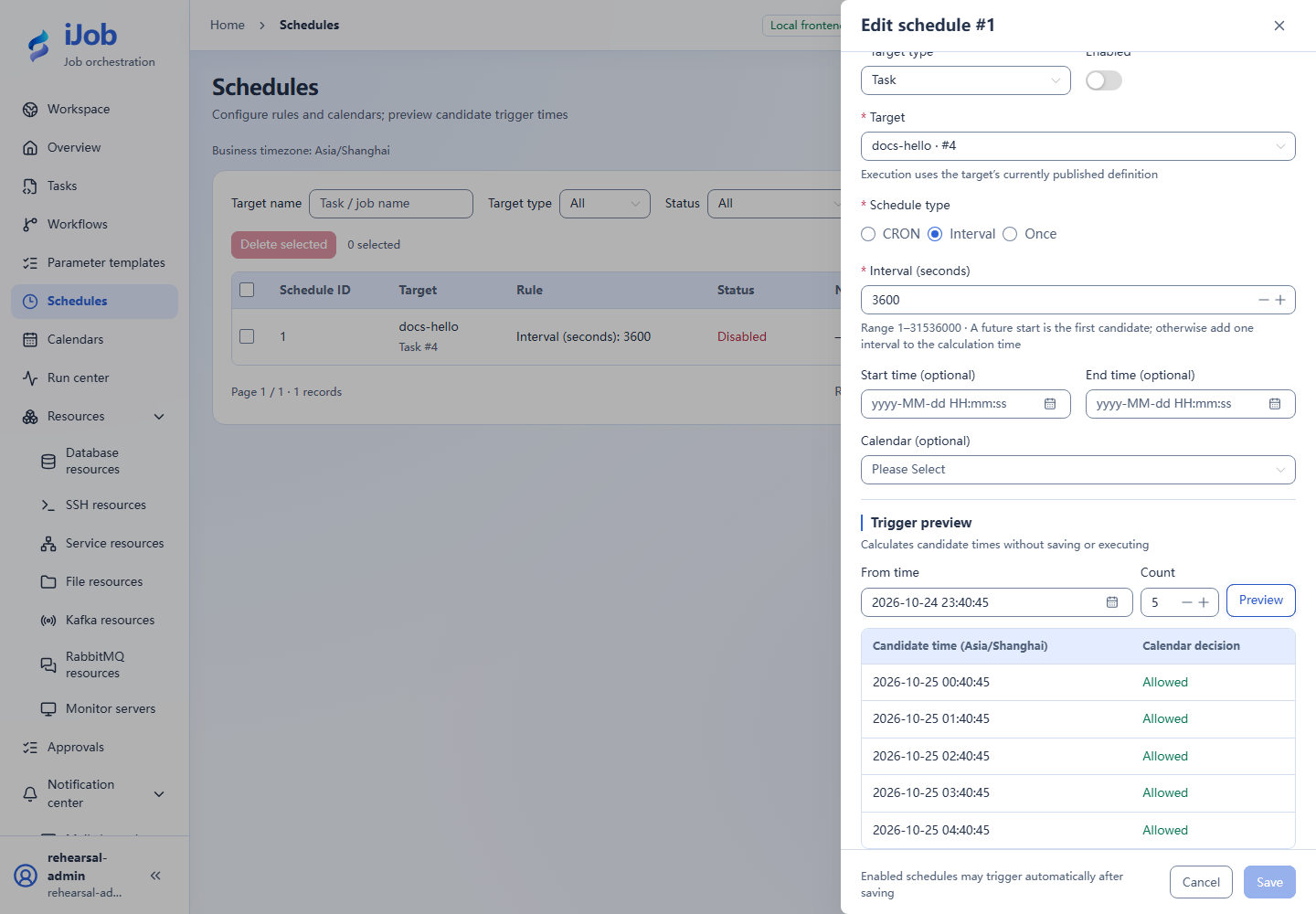
Create a disabled 3600-second interval schedule for docs-hello. Preview 5 candidates and inspect business timezone/start/end. The UI display timezone does not change the business timezone.
2. Exclude a date with a calendar
Create a calendar excluding a future date in the preview range, bind it and preview again. Confirm that date is excluded from eligible execution times.
3. Prepare three recovery schedules
Only in the dedicated stoppable installation, create three harmless tasks with the same content as docs-hello and different task names identifying SKIP, FIRE_ONCE, and CATCH_UP_BOUNDED. Add a CRON schedule for each, using 0 * * * * * and its corresponding recovery policy. Schedules have no name field; identify each record by its target task and schedule ID.
Set grace to 5 seconds and queue delay to 600 seconds on each; set the bounded catch-up count to 2. Check that the deployment catch-up window covers the planned downtime; do not assume an arbitrary per-schedule window field.
Choose a future minute boundary T0 with enough preparation time. Set all three schedules to start at T0 and end two minutes later; the end tick is included in this example. Remove the calendar binding or ensure the date is allowed. Preview from one second before T0 and confirm exactly T0, T0+1 minute, and T0+2 minutes. Then enable all three schedules and confirm their state, and finish a normal shutdown before T0. T0 means a future date/time you choose, not text to enter literally.
4. Record a controlled downtime window
Stop the dedicated installation normally before T0 and resume after T0+2 minutes+6 seconds, so all three ticks exceed the 5-second grace. Resume within the 600-second queue deadline and configured catch-up window. Record actual stop/recovery times and confirm Worker readiness without terminating other instances. The finite end time prevents additional regular minute ticks after recovery.
5. Count recovered runs by planned time
Count only planned times inside that downtime window, excluding normal future runs. With all three within catch-up/queue deadlines, expect SKIP=0, FIRE_ONCE=1 and bounded catch-up=2. Inspect linked instances/logs, then disable all three schedules.
Expected results
| Check | Expected value |
|---|---|
| Calendar preview | Excluded date is not eligible; preview itself does not execute |
| SKIP | No recovery triggers; count 0 |
| FIRE_ONCE | One recovery trigger with a SUCCESS instance |
| CATCH_UP_BOUNDED, limit 2 | Two recovery triggers, both linked instances SUCCESS |
Common failures
| Symptom | Action |
|---|---|
| Unexpected count | Inspect actual downtime, grace, queue deadlines and Worker groups; separate future regular runs from catch-up. |
| SKIPPED trigger without an instance | A queue deadline may have expired; this is different from a running task failing. |
Safety and cleanup
Disable all practice schedules, inspect pending triggers and restore the dedicated installation's prior settings.
Version and limitations
Applies to iJob 1.0.0. The example uses a separate Windows installation, Asia/Shanghai business time, and a finite three-tick CRON window; policy results are 0 / 1 / 2 in both interface languages. Calendar preview is a preliminary exercise, not coverage of every calendar/recovery-policy combination. Other timezones, DST, and multi-node outages require separate checks. The image below shows candidate preview rather than recovered runs.
Interface reference
These are actual interface references for this capability. Names and instance IDs may differ from your run; follow the steps and expected results for extensions.