
File transfer and archives
Applies to 1.0.0. Tasks → New/Edit → plugin FILE_TRANSFER.
Before you start
Use ADMIN to create, configure and save tasks. ADMIN or OPERATOR can execute published definitions; ADMIN reads detailed logs and input/output variables. Resources must be enabled and reachable from the execution node. See tasks for common timeout, retry and version settings, and the permission matrix.
Field reference
“Default” means the initial value of a new 1.0.0 form. An empty value means the field has not been filled in; required fields still need a value. Visibility follows the selected branch; conditional requirements apply only to that branch.
Transfer and publication
| Field | Required | Default | Visible when | Scope |
|---|---|---|---|---|
| Transfer mode | Has a default | TRANSFER | Always | Current task version |
| Source file resource | Required | Empty | Always | Current task version |
| Target file resource | Conditionally required | Empty | TRANSFER | Current task version |
| Source directory (optional) | Optional | Empty | Always | Current task version |
| Target directory (optional) | Optional | Empty | TRANSFER | Current task version |
| File pattern | Has a default | * | Always | Current task version |
| Recursive | Has a default | false | Always | Current task version |
| Decompress after download | Has a default | NONE | Always | Current task version |
| Compress before upload | Has a default | NONE | Always | Current task version |
| Remote publication | Has a default | TEMP_RENAME | TRANSFER | Current task version |
| Overwrite existing files | Has a default | true | TRANSFER | Current task version |
| Delete source after success | Has a default | false | TRANSFER | Current task version |
| Archive name (optional) | Optional | Empty | ZIP/TAR/TAR_GZ/SEVEN_ZIP compression | Current task version |
| Compression level | Has a default | DEFAULT | ZIP compression | Current task version |
- Transfer mode: Choose read-only access or transfer to a target.
- Source file resource: Provide the source file location and access configuration.
- Target file resource: Provide the upload target location and access configuration.
- Source directory (optional): Select the source directory within the resource path constraints.
- Target directory (optional): Select the target directory within the resource path constraints.
- File pattern: Filter files to read or transfer.
- Recursive: Include matching files in subdirectories when enabled.
- Decompress after download: Choose the decompression format after download.
- Compress before upload: Choose the compression format before upload.
- Remote publication: Choose direct writes or temporary-file publication followed by rename; capabilities depend on the target protocol.
- Overwrite existing files: Choose whether existing target files may be overwritten.
- Delete source after success: Delete source files after success; cross-system copy and deletion do not form one transaction.
- Archive name (optional): Name the output archive for applicable compression formats.
- Compression level: Set the ZIP compression level.
Execution limits
| Field | Required | Default | Visible when | Scope |
|---|---|---|---|---|
| Maximum scan depth | Has a default | 32 | Advanced settings | Current task version |
| Scan entry limit | Has a default | 10000 | Advanced settings | Current task version |
| Source file limit (bytes) | Has a default | 268435456 | Advanced settings | Current task version |
| Source total limit (bytes) | Has a default | 1073741824 | Advanced settings | Current task version |
| Staging limit (bytes) | Has a default | 2147483648 | Advanced settings | Current task version |
| Extraction entry limit | Has a default | 10000 | Advanced settings | Current task version |
| Extracted entry limit (bytes) | Has a default | 268435456 | Advanced settings | Current task version |
| Extraction total limit (bytes) | Has a default | 1073741824 | Advanced settings | Current task version |
| Maximum compression ratio | Has a default | 100 | Advanced settings | Current task version |
- Maximum scan depth: Maximum recursive directory depth, 0–64.
- Scan entry limit: Maximum directory and file entries scanned per task, 1–100000.
- Source file limit (bytes): Per-source-file byte limit, 1–1073741824.
- Source total limit (bytes): Cumulative source byte limit, at least the per-file limit and at most 10737418240.
- Staging limit (bytes): Cumulative staging-byte limit, 1–21474836480.
- Extraction entry limit: Maximum extracted entries, 1–100000.
- Extracted entry limit (bytes): Per-extracted-entry byte limit, 1024–1073741824.
- Extraction total limit (bytes): Cumulative extracted-byte limit, at least the per-entry limit and at most 10737418240.
- Maximum compression ratio: Maximum allowed extraction compression ratio, 1–1000.
Behavior and boundaries
- READ_ONLY does not upload files and cannot delete source files.
- TEMP_RENAME depends on the target protocol and does not guarantee atomic publication for every target.
- With deleteSource=true, source and target cannot be the same resource; cross-system copy and deletion do not form one transaction.
The new form selects TEMP_RENAME; older configuration without remotePublishMode falls back to DIRECT. Choose explicitly for the target protocol and inspect temporary/final files after failures.
Typical configuration: Copy CSV files between isolated directories
Fill in the form below, replacing resource names with your enabled resources. This is a configuration guide, not importable JSON. Follow the tutorial linked below for data preparation and execution.
Prepare CSV files in the source directory and a separate empty target directory; the executing Worker must be able to access both LOCAL directories.
| Setting | Value |
|---|---|
| Transfer mode | TRANSFER |
| Source file resource | Isolated LOCAL source directory |
| Target file resource | Isolated LOCAL target directory |
| File pattern | *.csv |
| Overwrite existing files | true |
| Delete source after success | false |
Expected result: Corresponding target files exist with matching contents/hashes, and source files remain.
Follow the full tutorial. Save the definition before running it; inspect execution state and business results separately.
Actual interface
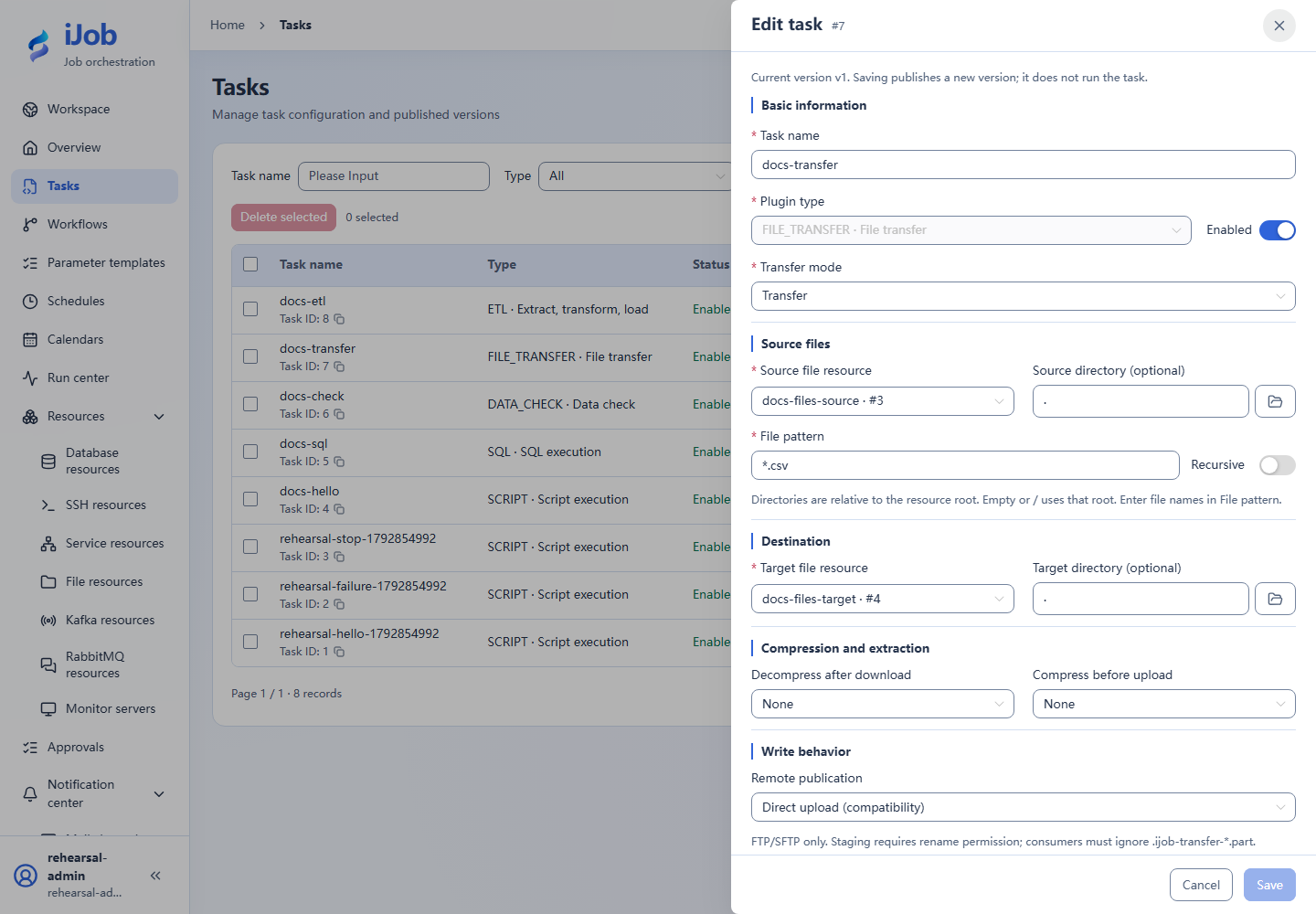
Configuration keys
Use these keys when inspecting imported configuration, API payloads or errors. [] denotes a collection item; the form does not require you to enter key names.
| Category / field | Configuration key |
|---|---|
| Transfer and publication / Transfer mode | mode |
| Transfer and publication / Source file resource | sourceResourceId |
| Transfer and publication / Target file resource | targetResourceId |
| Transfer and publication / Source directory (optional) | sourcePath |
| Transfer and publication / Target directory (optional) | targetPath |
| Transfer and publication / File pattern | filePattern |
| Transfer and publication / Recursive | recursive |
| Transfer and publication / Decompress after download | decompressType |
| Transfer and publication / Compress before upload | compressType |
| Transfer and publication / Remote publication | remotePublishMode |
| Transfer and publication / Overwrite existing files | overwrite |
| Transfer and publication / Delete source after success | deleteSource |
| Transfer and publication / Archive name (optional) | archiveName |
| Transfer and publication / Compression level | compressionLevel |
| Execution limits / Maximum scan depth | maxScanDepth |
| Execution limits / Scan entry limit | maxScannedEntries |
| Execution limits / Source file limit (bytes) | maxSourceFileBytes |
| Execution limits / Source total limit (bytes) | maxSourceTotalBytes |
| Execution limits / Staging limit (bytes) | maxStagingBytes |
| Execution limits / Extraction entry limit | maxArchiveEntries |
| Execution limits / Extracted entry limit (bytes) | maxExtractedEntryBytes |
| Execution limits / Extraction total limit (bytes) | maxExtractedTotalBytes |
| Execution limits / Maximum compression ratio | maxCompressionRatio |
Related pages
Tasks and versions · Parameters and expressions · Scenario tutorials