Workflows: composition, publication and versions
Entry and workflow
Workflows → New workflow. ADMIN can design, save and publish workflows. ADMIN or OPERATOR can execute published versions. VIEWER reads summaries and cannot execute. See the role matrix for all actions.
Configuration and actions
Obstacle avoidance/simple curves are display preferences. Auto layout changes node positions and is saved with the version. Neither changes dependencies, but their persistence differs.
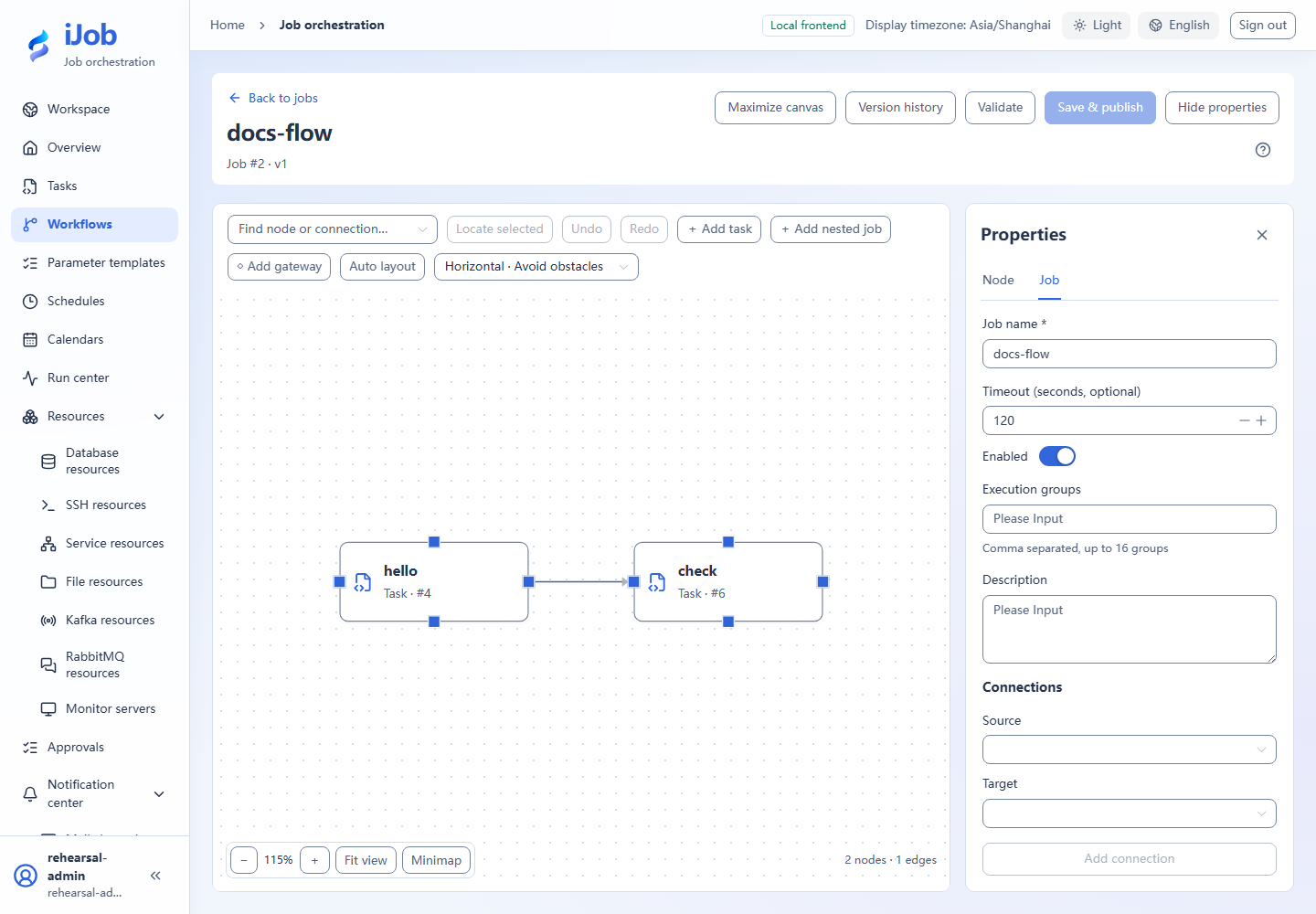
Job fields
| Field | Required | Initial form value | Shown when | Description |
|---|---|---|---|---|
| Job name | Required | Empty | Always | Identify the business workflow, up to 128 characters. |
| Description | Optional | Empty | Always | Describe its purpose, inputs and external results. |
| Enabled | Initialized | On | Always | Disabled jobs reject new execution requests. |
| Timeout (seconds, optional) | Optional | Empty | Always | Set an execution deadline for the job. |
| Execution groups | Optional | Empty | Always | Up to 16 groups, restricting root-job claims rather than account permissions. |
Graph and publication actions
| Action | Roles | Available when | Result |
|---|---|---|---|
| Add task | ADMIN | Editing the current job; the referenced task is available | Add a node referencing a published task. |
| Add nested job | ADMIN | Editing the current job; the referenced job is available | Reuse a published job; publication fixes the referenced version. |
| Add gateway | ADMIN | Editing the current job | Configure exclusive routing with at least two routes and exactly one default. |
| Add connection | ADMIN | Nodes exist; no self-links, duplicates or cycles | Connect upstream to downstream to define execution dependencies. |
| Auto layout | ADMIN | Editable graph with nodes | Rearrange nodes. Layout is published with the job version and this creates unpublished changes. |
| Validate | ADMIN | Job draft and reference metadata are available | Check graph and references. Passing does not save the job or lock reference versions. |
| Save & publish | ADMIN | Validation passes, references are confirmed and no version conflict remains | Capture current child versions transactionally; do not execute automatically. |
| Version history | ADMIN / OPERATOR / VIEWER | Published versions exist | Read the version list; opening the read-only graph additionally requires ADMIN. Later child edits do not change old snapshots. |
| Open published child graph | ADMIN | The snapshot node references a nested job | View the nested graph fixed by the snapshot reference. |
Use and verify
For a minimal flow, add hello/check task nodes, connect hello→check and use ALL_SUCCESS/STOP. Publish and run, then inspect the run graph. Multiple nodes cannot be isolated or cyclic; bounds are 1–500 nodes and 5000 edges. See Nodes/gateways.
Real page examples
Two-node workflow and job properties.