
Script
Applies to 1.0.0. Tasks → New/Edit → plugin SCRIPT.
Before you start
Use ADMIN to create, configure and save tasks. ADMIN or OPERATOR can execute published definitions; ADMIN reads detailed logs and input/output variables. Resources must be enabled and reachable from the execution node. See tasks for common timeout, retry and version settings, and the permission matrix.
Field reference
“Default” means the initial value of a new 1.0.0 form. An empty value means the field has not been filled in; required fields still need a value. Visibility follows the selected branch; conditional requirements apply only to that branch.
Execution settings
| Field | Required | Default | Visible when | Scope |
|---|---|---|---|---|
| Execution mode | Select | LOCAL | Always | Current task version |
| SSH resource | Conditionally required | None | SSH | Current task version |
| Script engine | Required | SHELL | Always | Current task version |
| Python interpreter | Conditionally required | python3 | PYTHON | Current task version |
| Script content | Required | Empty | Always | Current task version |
| Working directory (optional) | Optional | Empty | Always | Current task version |
| Script encoding | Has a default | UTF-8 | Always | Current task version |
| Output encoding | Has a default | UTF-8 | Always | Current task version |
| Environment variables | Optional | Empty list | Always | Current task version |
- Execution mode: LOCAL executes on the Worker; SSH executes on the resource's remote host.
- SSH resource: Select an enabled SSH resource.
- Script engine: LOCAL supports SHELL/BAT/POWERSHELL/PYTHON; SSH supports only SHELL/PYTHON.
- Python interpreter: A single interpreter command or path without appended arguments.
- Script content: Script content; supports platform variable replacement.
- Working directory (optional): For LOCAL, leave blank to use the process working directory. For SSH, use a remote absolute path starting with /. This field does not perform platform variable interpolation.
- Script encoding: Character encoding of the generated script file.
- Output encoding: Character encoding used to decode stdout/stderr.
- Environment variables: Environment variables are not secret storage; SSH names use [A-Za-z_][A-Za-z0-9_]*. This field does not perform platform variable interpolation.
Behavior and boundaries
- The complete script configuration is limited to 8 MiB.
- The platform replaces script ${name}; escape native ${...} as $${...}.
- A nonzero exit code means failure; logs and outputs are bounded.
- Closing an SSH connection does not establish that the remote process has terminated.
- Only script performs platform interpolation; env and workingDir are static configuration values.
Typical configuration: Publish a processed-row count of three
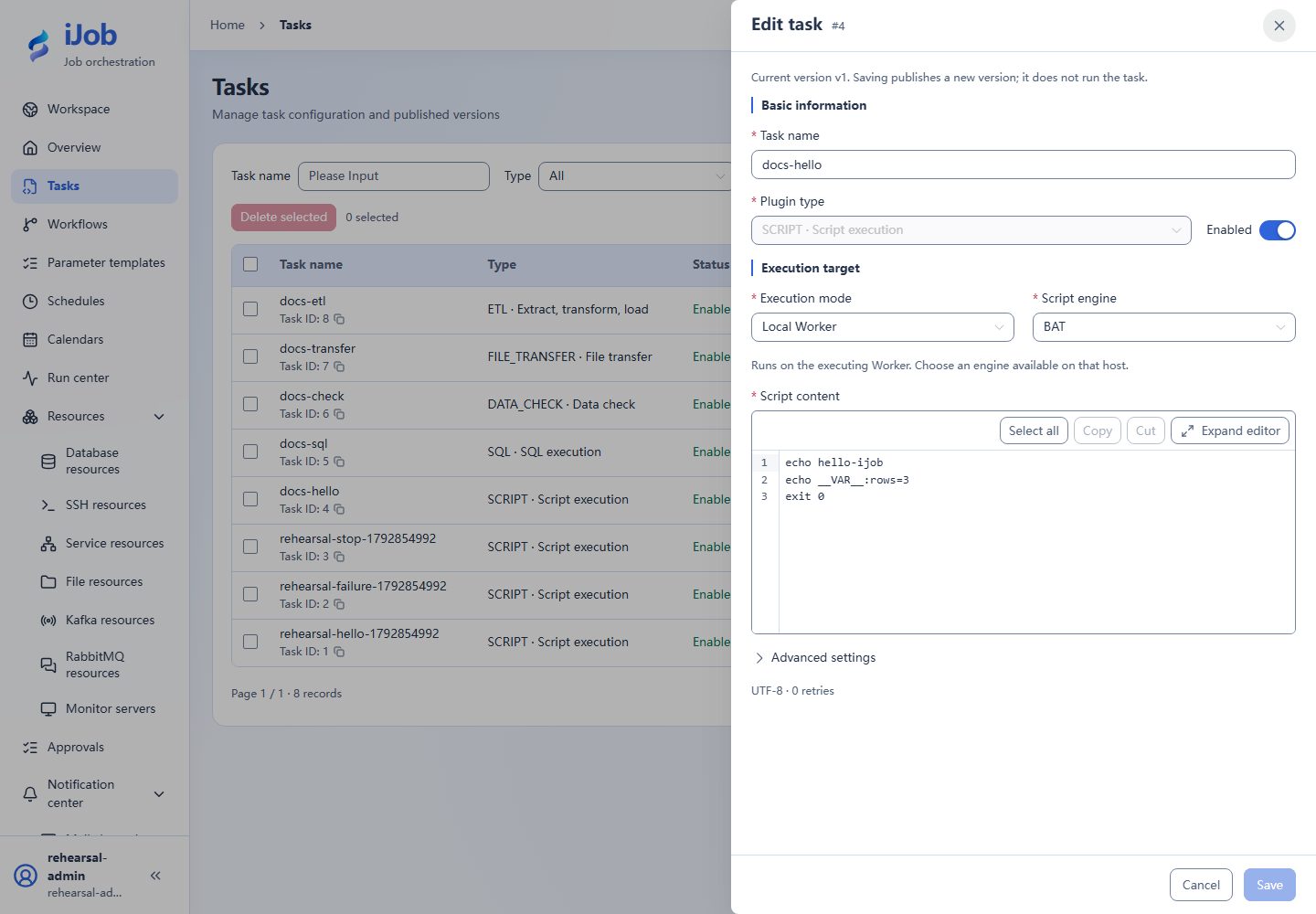
Fill in the form below, replacing resource names with your enabled resources. This is a configuration guide, not importable JSON. Follow the tutorial linked below for data preparation and execution.
Use a Worker with a BAT or SHELL interpreter. This script outputs text and variables; it does not process orders.
| Setting | Value |
|---|---|
| Execution mode | LOCAL |
| Script engine | Windows: BAT / Linux: SHELL |
| Script content | See code below |
Script content:
echo hello-ijob
echo __VAR__:rows=3
exit 0
Expected result: The instance is SUCCESS, output variable rows is the string "3", and the logs contain hello-ijob.
Follow the full tutorial. Save the definition before running it; inspect execution state and business results separately.
Actual interface
Configuration keys
Use these keys when inspecting imported configuration, API payloads or errors. [] denotes a collection item; the form does not require you to enter key names.
| Category / field | Configuration key |
|---|---|
| Execution settings / Execution mode | executionMode |
| Execution settings / SSH resource | sshResourceId |
| Execution settings / Script engine | engine |
| Execution settings / Python interpreter | interpreter |
| Execution settings / Script content | script |
| Execution settings / Working directory (optional) | workingDir |
| Execution settings / Script encoding | scriptCharset |
| Execution settings / Output encoding | outputCharset |
| Execution settings / Environment variables | env |
Related pages
Tasks and versions · Parameters and expressions · Scenario tutorials